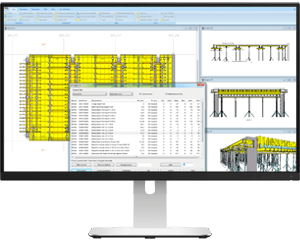
Tipos 9
Planning made easier with Tipos 9
With its planning software Tipos 9, Doka gives you a helpful and easy-to-use software tool for optimised formwork planning at your site.


Optimised materials planning
for your site
Cost-optimisation for your formwork and safety platforms, thanks to
- customised solutionscomplete plansfast planning at your fingertipsaccurate bills of materials (incl. connections and accessories)approx. 40,000 proven solutionshigh safety with statically accurate planningcost-effective planning of projects with multiple cycles / build sections
Intuitive operation
Tipos 9 is user-friendly and flexible in its adaptability
Just enter the whole structure with the 'Schal-Igel®' on-screen assistant (or wizard) and let Tipos form it for you automatically. With new functions, you can customize your formwork solution and minimize your workload. Tooltips optimise handling and are rounded out by the Help feature plus comprehensive e-learning contents. You can choose between 9 different language versions of the programms.
Outstanding flexibility
with interactive manual intervention
You can interactively intervene in the planning programme whenever you wish, in order to incorporate changed conditions on the site into planning.
- After forming, the structure can be modified, deleted or expanded.
- Ground plans, sections, photos and texts from other programmes can be integrated without difficulty.
- Several Tipos programmes can be open at the same time.
- The "Undo" function works continuously for several steps.
- The 3D poster graphics are significantly faster.
User-specific formwork solutions
As often requested from now on there are new user-specific formwork solutions in version 9 available. With the commands “Define” and “Browse” you can create your own formwork solution. More details in our Talk - User-specific formwork solutions.
Mixed cycle sequences (BIM)
The sequence of cycles (pours) can be defined now also in the slabs. All cycles (pours) for walls and slabs can be mixed in chronical order. More details in our Talk - Cycles.
Additional fixings
In the plan window you can mark additional fixings like e.g. “Framax quick acting clamp RU” or “Framax multi-function clamp” with stars.
Tipos Explorer Preview
The current preview of Tipos-projects, which were only visible in the dialogue “Open file”, is now replaced by the standard preview in the explorer. Please activate via “View” in the explorer the option “Preview pane”.
Helpful tooltips
Tooltips optimise handling and are rounded out by the Help feature plus comprehensive e-learning contents.
Doka Wall Systems
- all framed formwork
- framed formwork Xlife with Xsafe platform system
- large-area formwork Top 50, FF20, FF100 tec, FL20 U100
- circular formwork H20
- Framax Xlife plus
- Framax Xlife 3,00m
- Framax eco
- ReForma Standard Plus
Doka Floor Systems
- Dokaflex 1-2-4
- Dokaflex 15
- Dokaflex 30 tec
- Dokaflex S
- Doka Xtra
- Dokadek 20
- Dokadek 30
- Dokamatic table
Doka Safety Systems
- Edge protection system XP on structureBracket platform MFolding platform K
Doka Load-bearing Systems
- Staxo
- Staxo 40
- Staxo 100
- Load-bearing tower d2
- Staxo 100 F
- Staxo 100 eco
- Operating system 64-bit: Windows 7 SP1 / Windows 8.1 / Windows 10CPU: Dual-Core 2 GHz4 GB RAM5 GB free hard disk space (recommended SSD)Screen resolution 1280 x 1024 pixels
- AT
- DE
- FR
- IT
- ES
- GB
- US
- HU
- RU
- SK
- PL
What versions of Tipos are there?
- Demo version: The demo version is the same as the full version except that the Print, Save and Clipboard functions are deactivated.
- Full version: Is activated by the authorisation code. We will send you the authorisation code after you register.
- Updates within a version use the same authorisation code.
What is particularly good at?
Tipos is especially suitable for fast planning of system formwork. Ideal for foremen planning the next day's forming operations, as well as for staff in scheduling departments. As Tipos also takes account of quantities when doing the planning, this also helps with the logistics. Formwork solutions for which there is not sufficient equipment on the site will not be included in the plan.
How do I update my version?
Updates are available for download. This includes a complete setup. It is recommended that you uninstall the existing version of the programme, and then install the current setup.
Where can I get help if I have a problem?
You can email questions about installation and authorisation to DFDS-Support@doka.com. For questions about how to use the programme, please use the built-in Help function. For formwork-engineering questions, please contact the Applications Technology Dept. at your nearest Doka branch.
What file formats can Tipos handle?
Tipos can open Tipos project files from the current and previous versions. This applies to max. two version levels before the current version. It can also import layouts from DXF files, and has a wide range of filtering functions for the geometrical elements to be imported. The layout can then be either redrawn or directly imported.
Do I need any special prior knowledge in order to use Tipos?
Tipos plans Doka formwork, but it is an easy-to-use Windows programme. The user interface makes use of terms that are common in the construction and formwork-engineering fields, so it is obviously an advantage to have technical knowledge in these areas. The same goes for basic skills in Microsoft Windows.
You can call up a Help box for every menu item and dialogue. To help you get started working in Tipos quickly and efficiently, we recommend the courses organised by Doka.
Why are there no article prices in Tipos?
Item prices are subject to change and depend on the country and currency. In addition, rental offers, for example, will depend on additional factors such as the length of the rental. To get an offer for a project that you have planned with Tipos, please contact your nearest Doka branch. Tipos project files can be read in electronically at all Doka branches as the basis for an offer.
How long will I continue to receive support for version 8?
Support for version 8 is discontinued on December 31, 2018.